In ICT trading, when price moves matters as much as where. The biggest moves of the day tend to start in a few short windows: the London open, the New York open, and the overlap between them. The free Kill Zones indicator for MT4 and MT5 shades those windows on your chart and draws Fibonacci levels across each one, so you do not have to box sessions by hand every morning.
The Four Kill Zones It Marks
| Zone | Time (New York, ET) | Why traders watch it |
|---|---|---|
| Asia | From 20:00 | Usually a quieter range that later sessions often raid |
| London Open | 02:00–05:00 | Often sets the day’s first real move |
| New York | 07:00–09:00 | US traders arrive. Continuation or reversal of the London move |
| London Close | 10:00–12:00 | Europe winds down. Profit-taking and late reversals |
The times are based on New York time, but your broker’s chart probably runs on a different clock. After you attach it, check that the London and New York boxes start where those sessions actually open on your chart. You can switch individual zones off, for example hiding Asia if you only trade London and New York.
Fibonacci Levels Inside Every Zone
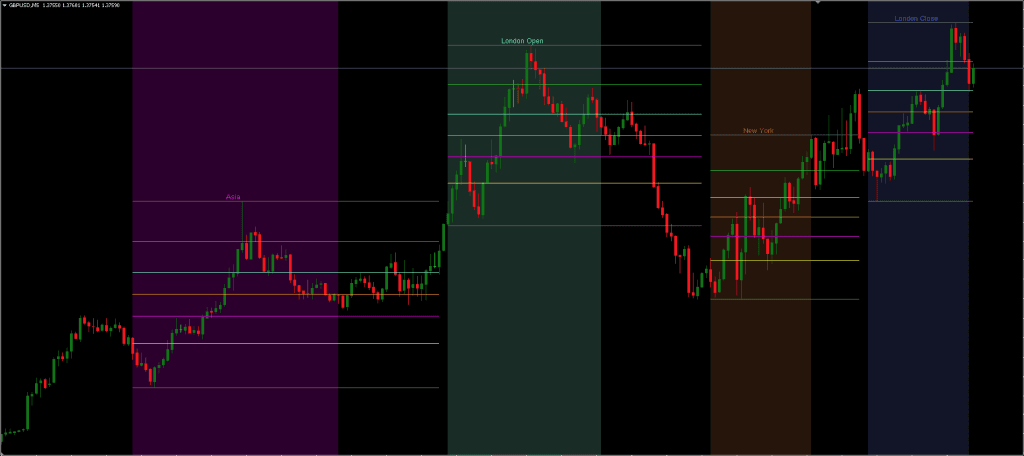
This is what sets it apart from a plain session-box indicator. Once a zone has a high and a low, the indicator draws Fibonacci retracement levels across that range. You can extend the lines beyond the zone to see how later price reacts to them. Between zones, the levels stay fixed on the last completed session’s range.
Look at the screenshot. The Asia range on GBPUSD gets taken out early in London Open, which breaks higher before rolling over. The New York session then builds a range near the London lows, and price climbs back through its upper levels into London Close. Those extended Fib lines give you ready-made reference points for targets and stops.
Is the Kill Zones Indicator Right for You?
- Yes, if you already trade ICT-style ideas (session ranges, liquidity raids, entries timed to London or New York) and want the sessions drawn for you.
- Yes, if you trade intraday on M1 to H1. Above H1, the zones become too small to be useful.
- Probably not, if you want buy and sell signals. It does not give any. It shows time and structure, and the trade decision is still yours.
It works on forex, metals, indices, crypto and more. As always, practise on a demo account first. More free tools are on our free EAs and indicators page.
Converting the Kill Zones to Your Broker’s Clock
Many MT4 and MT5 brokers run their servers on GMT+2 in winter and GMT+3 in summer. That keeps the server clock seven hours ahead of New York all year round. On a broker like that, the zones fall at roughly these times:
| Zone | New York (ET) | Server time (GMT+2/+3) |
|---|---|---|
| Asia | From 20:00 | From 03:00 |
| London Open | 02:00–05:00 | 09:00–12:00 |
| New York | 07:00–09:00 | 14:00–16:00 |
| London Close | 10:00–12:00 | 17:00–19:00 |
Your broker’s server time is shown at the top of the Market Watch window. If it uses a different offset, shift the times by the difference. The US and Europe change their clocks on different dates in spring and autumn, so for a week or two each year the gap can be an hour off.
A Simple Daily Kill Zones Routine
- Before London opens, note the Asia high and low.
- During London Open, watch for price to raid one side of the Asia range and then reject it.
- In the New York zone, look for continuation or reversal around the Fibonacci levels of the London range.
- Outside the zones, manage open trades rather than opening new ones.
- At the close of each day, take a screenshot of each zone and note what happened. After a few weeks you will see which session gives your pair its cleanest moves, and you can focus your time there.
Install It
- Download the zip below and unzip it. It contains an MQL4 folder for MT4 and an MQL5 folder for MT5.
- In MetaTrader, open File → Open Data Folder, then:
- MT4: paste ICT Killzones Indicator.ex4 into MQL4 → Indicators
- MT5: paste ICT Killzones Indicator.ex5 into MQL5 → Indicators
- Bonus: the zip also includes a Breaker Blocks Indicator folder with its own MQL4 and MQL5 files. Copy those into the same Indicators folders if you want it.
- Restart MetaTrader, or right-click Indicators in the Navigator and choose Refresh.
- Drag it onto an M1–H1 chart and check the zones line up with your broker’s session times.
ICT Kill Zones Indicator – MT4 & MT5
Zip file · 309 KB · .ex4 and .ex5 · bonus: Breaker Blocks indicator
Download Free- Telegram channel: https://t.me/StunnedCandles
- Contact me directly: https://t.me/StunnedCandlesAdmin
Risk warning: Trading forex, CFDs and synthetic indices carries a high risk of loss and is not suitable for everyone. This indicator is provided free for education and is not financial advice. It does not guarantee profits. See our Risk Disclaimer.